

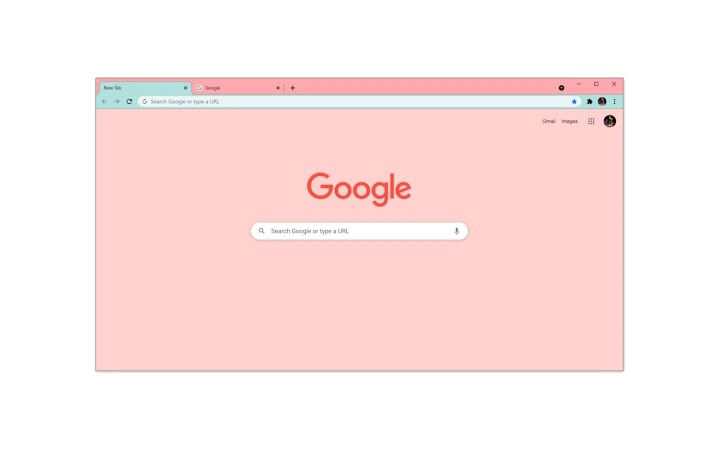
Description
Create Custom Themes in Minutes
Overview
The software is designed to empower users with the ability to create personalized browser and desktop themes. It serves as a utility for individuals seeking to customize their digital environment with unique visual styles. The application targets both casual users and design enthusiasts who value personal expression through interface aesthetics. While the developer’s background is not detailed, the tool is positioned as a straightforward solution for theme creation without requiring advanced technical skills. It is suitable for users who want to enhance their browsing and desktop experience with custom visuals. Real-world usage includes personalizing workstations, preparing presentations with branded themes, or simply exploring creative design options. The software supports both Windows and Mac platforms, making it accessible to a broad audience. It is particularly useful for users who want to maintain a consistent visual identity across their digital workspace.
Key Features & Capabilities
- Theme Creation Interface – A built-in editor allows users to design custom themes from scratch using visual tools and preset templates. This enables quick customization of color schemes, fonts, and background elements.
- Multi-Platform Support – Users can create themes compatible with both Windows and Mac operating systems, ensuring consistency across different devices.
- Browser Theme Integration – The software facilitates exporting themes directly to major browsers, streamlining the process of applying custom visuals to web environments.
- Export & Sharing Options – Created themes can be saved locally or shared with others, supporting community-driven design exchange.
- Lightweight Design – With a file size of 20 MB, the application is optimized for efficient performance and minimal system impact.
These features support practical workflows such as branding a personal computer for a creative project, developing a cohesive look for a remote team’s digital workspace, or generating unique themes for social media content. The intuitive design ensures that users can begin creating without prior experience in graphic design.
User Interface, Workflow & Performance
The user interface is structured around a central workspace with accessible toolbars and preview panels. Navigation is straightforward, with menu options clearly labeled and organized by function. Users can switch between design modes, apply changes in real time, and preview results instantly. The workflow is linear: create, customize, test, export—reducing friction in the theme development process. While exact performance details were not specified, the lightweight nature of the software suggests efficient operation across standard hardware configurations. The developer did not specify resource usage details, but general behavior indicates minimal CPU and RAM consumption during active use. Stability appears consistent with typical desktop utilities of similar scope, though no long-term usage reports were provided. Overall, the interface promotes ease of use and reduces the learning curve for new users.
Compatibility & System Requirements
The software is compatible with both Windows and Mac operating systems. The current version is 1.0, and the installation size is 20 MB. Platform compatibility information is limited to the operating systems listed. Exact system requirements were not listed, and no specific hardware specifications were provided. Users are advised to ensure their system meets standard desktop application requirements for smooth operation. The developer did not include detailed information on processor speed, RAM, or storage needs. Compatibility with older OS versions remains unspecified.
Pros and Cons
Pros
- Free to use with no hidden costs
- Supports both Windows and Mac platforms
- Lightweight at only 20 MB
- Intuitive interface for beginners
- Direct browser theme export functionality
Cons
- No detailed system requirements provided
- Performance under heavy workloads not documented
- Limited customization depth beyond visual elements
- Developer background not disclosed
- No built-in collaboration or cloud sync features
FAQ Section
Is the software free to download and use?
Yes, the software is available at no cost. There are no subscription fees or in-app purchases required.
Which operating systems does it support?
The software is compatible with both Windows and Mac operating systems.
Can I use the created themes on my web browser?
Yes, the software includes functionality to export themes directly to major web browsers.
How large is the installation file?
The installation size is 20 MB, making it a lightweight desktop application.
Does the software require an internet connection?
While the software can function offline, some features such as theme sharing may require an internet connection.
Final Thoughts
This desktop utility offers a practical and accessible way to design custom browser and desktop themes. Its lightweight footprint, cross-platform compatibility, and free availability make it a compelling choice for users seeking creative personalization without technical barriers. While it lacks advanced features and detailed documentation, it fulfills its core purpose efficiently. The tool is ideal for students, remote workers, and hobbyist designers who want to enhance their digital workspace with unique visuals. For those prioritizing simplicity, affordability, and visual customization, this software delivers a solid experience. Download Theme Creator Pro now.
Guides & Tutorials for Calm Pastel Theme for Chrome
How to install Calm Pastel Theme for Chrome
- Click the Preview / Download button above.
- Once redirected, accept the terms and click Install.
- Wait for the Calm Pastel Theme for Chrome download to finish on your device.
How to use Calm Pastel Theme for Chrome
This software is primarily used for its core features described above. Open the app after installation to explore its capabilities.
User Reviews for Calm Pastel Theme for Chrome 0
No reviews found





